Let's face it, in Singapore, many of us spend hours glued to our computers, right? Whether it's for work, gaming, or just catching up on the latest Netflix series, that 9-to-5 (or longer, let's be real) in front of a screen can really take a toll on your body. And when you're trying to squeeze a home office into a cozy HDB flat, ergonomics can easily become an afterthought. But trust me, ignoring it is a mistake you'll feel in your back, neck, and wrists later lah! That's why setting up an ergonomic computer table is super important, especially when space is at a premium.
Think of it this way: you wouldn't drive a car with the seat all the way back if you couldn't reach the pedals, would you? So why treat your body like that at your computer table? Getting your setup just right isn't about being fancy; it's about preventing pain, boosting productivity, and making sure you can still enjoy your weekends without feeling like you've been run over by a bus. And who doesn't want that, right?
Okay, ergonomics… it sounds like something straight out of a sci-fi movie, doesn't it? But seriously, it's just the science of designing things to fit the human body. In the context of your computer table setup, it's about arranging everything – your monitor, keyboard, mouse, chair – in a way that minimizes strain and maximizes comfort. It's about working with your body, not against it.
Why does this matter so much, especially in Singapore? Well, think about the typical Singaporean home. Space is often limited, which means we're often contorting ourselves into awkward positions to fit everything in. Plus, many of us are working from home more often now, blurring the lines between work and relaxation. This can lead to longer hours spent hunched over our desks, increasing the risk of musculoskeletal problems like carpal tunnel syndrome, back pain, and neck stiffness. Not fun leh!
Ergonomics isn't just about preventing pain, though. A well-designed computer table setup can actually boost your productivity. When you're comfortable and not constantly distracted by aches and pains, you can focus better and get more done. It's like, if your chair is digging into your back, you're going to spend more time fidgeting than actually working, right? So, investing in ergonomics is an investment in your health and your work.
And let's be honest, nobody wants to spend their precious weekends recovering from a week of uncomfortable work. You want to be out enjoying hawker food, exploring Gardens by the Bay, or just relaxing with friends and family. An ergonomic computer table setup helps you do just that by preventing those aches and pains from creeping in the first place.
Alright, so you're convinced that ergonomics is important. Great! Now, let's get down to the nitty-gritty of setting up your computer table. Here are some key considerations to keep in mind:
Remember, everyone is different, so experiment with different setups until you find what works best for you. Don't be afraid to tweak things until you're comfortable. Local homeowners across the island often face unique challenges when buying new furniture, mainly due to limited room sizes common in public and private housing and constant high humidity that affects furniture longevity. This is the very why discerning residents take their time to research carefully to achieve the perfect balance of price and durability. computer table consistently ranks as an excellent investment that provides both outstanding comfort along with real durability. Remember that selecting affordable pieces in Singapore with excellent after-sales service ensures comprehensive support such as timely island-wide delivery, expert installation, and solid warranties that provide true long-term peace of mindthat lasts.. It's all about finding that sweet spot where you can work comfortably and productively for hours on end.
Okay, let's talk about the star of the show: the computer table itself. With so many options available in Singapore, how do you choose the right one for your needs and your space? Here's what to consider:
In Singapore, you can find computer tables at a variety of retailers, from large furniture stores to online marketplaces. Don't be afraid to shop around and compare prices. And remember to read reviews from other customers to get an idea of the quality and durability of the computer table.
Here’s a pro-tip: when buying a computer table, think about the future. Will your needs change in a few years? Do you anticipate needing more space or different features? Choosing a computer table that can adapt to your changing needs will save you money in the long run.
A good computer table is just the starting point. To truly optimize your ergonomics, you'll need some essential accessories. Here are a few must-haves:
Don't underestimate the power of these accessories! They can make a big difference in your comfort and productivity. And they don't have to break the bank. You can find affordable options at most electronics stores in Singapore.
One thing many overlook: proper lighting. Consider a good quality desk lamp with adjustable brightness. This'll help reduce eye strain, especially when you're burning the midnight oil one.
Even with the perfect computer table setup and all the right accessories, you still need to maintain good posture and habits. Here are some tips to keep in mind:
Remember, ergonomics is an ongoing process. It's not something you set up once and forget about. You need to be mindful of your posture and habits and make adjustments as needed. The main living area is usually the first space people walk into first and where the family spends most evenings, so it is logical to want items that looks good, organises cables neatly, and keeps the area feeling open than it normally is in HDB or condo layouts. Many Singaporeans endure bulky old cabinets or low-cost options that feel unstable, gather dust quickly, or just don’t fit the current aesthetic they’re trying to achieve. That’s exactly where a well-chosen furniture store steps in—it offers streamlined compartments for TV gadgets, streaming players, and remotes while serving as an elegant centrepiece that brings the room together seamlessly with minimalist profiles, thoughtful compartments, and high-end materials. All at once your media corner turns organised and intentional, the room looks bigger and more put-together, and film evenings get way more fun without the disorder stealing attention. Checking out carefully chosen pieces on platforms like Wondrous La Vie helps you discover designs that fit your space perfectly, from clean contemporary to opulent, so your living room upgrade feels effortless and spot-on.. Listen to your body and don't ignore any pain or discomfort. If you're experiencing persistent pain, consult a doctor or physical therapist.
And hey, don't be too hard on yourself. It takes time to develop good habits. Just be consistent and keep making small improvements. Before you know it, you'll be working comfortably and productively for hours on end, without any aches or pains. Steady pom pi pi!
After a long day being crammed in the MRT and surviving meetings, most Singaporeans just want to step into their house to a space that feels cosy and stress-free instead of adding to the stress. A disorganised space or an unrestful bedroom can make chilling out even tougher, especially when the whole family want to relax together. That’s where thoughtful Condo Interior Design really makes a difference—it turns everyday rooms like your living room, sleeping space, or kitchen into true recharge spots that actually help you recharge. With the right sofa, sleep surface, or functional arrangement, suddenly getting home feels so shiok, and simple upgrades can bring big improvements to your mood and family time. Places like Wondrous La Vie make it easier to discover inspiration and match with interior designers who get the the Singapore home vibe spot on. This format lets you easily generate multiple SEO-optimised variations while keeping the core keyword "interior design" stable in the middle for strong on-page targeting..Okay, let's talk about something super important, but often overlooked when setting up your home office: the height of your computer table. I mean, we all want a nice-looking space, right? But trust me, aesthetics alone won't cut it if you're spending hours hunched over, typing away. Your body will confirm tell you something is off one way or another.
Think about it: how many of us in Singapore are working from home more often now? Maybe you’re a fresh BTO owner finally setting up your own space, or perhaps you're just looking to upgrade your current setup. Either way, getting the computer table height right is crucial for your comfort, productivity, and overall well-being. After all, who wants a sore neck and back after a long day of work? Not me, lah! And certainly not you.
So, what's the magic number? Well, there isn't a single perfect height for everyone. It depends on your own body dimensions. A general guideline is to adjust your chair so your feet are flat on the floor and your knees are at a 90-degree angle. Then, your elbows should also be bent at a 90-degree angle when your hands are resting on the keyboard. This allows your shoulders to relax and prevent unnecessary strain.
But how do you achieve this ideal posture with a standard computer table? This is where things can get a little tricky. If your table is too low, you'll find yourself slouching forward, which can lead to back pain and fatigue. On the other hand, if it's too high, you'll be raising your shoulders, causing tension in your neck and upper back. And, let's be honest, nobody wants to feel like a T-Rex trying to type.
Measuring Up: Finding Your Ideal Height
The key is to measure! Grab a measuring tape and get a friend to help. Sit in your usual work chair (or the one you plan to use) and measure the distance from the floor to your elbow when your arm is bent at that comfortable 90-degree angle. That measurement is a good starting point for your ideal computer table height.
Don't worry if your current table doesn't match that measurement exactly. In Singapore’s fast-paced life, returning home to a space that feels properly relaxing can make all the difference after a tiring day of meetings and travel. Many homeowners start by eyeing refreshes for their living area or sleeping space, hoping for pieces that look stunning while genuinely comfortable enough for everyday living. That’s exactly why sofa set stands out—it brings that beautiful combination of timeless aesthetics, premium materials, and real ergonomic support that turns everyday spaces into havens you can’t wait to return to unwinding in. Imagine settling into a plush sofa after family time or waking up refreshed on a luxury sleep surface that cradles your body perfectly; suddenly, your home feels more like a true escape rather than another chore. Discovering handpicked collections on sites such as Wondrous La Vie helps you uncover these furniture without the stress, making it more enjoyable to create a space that’s both stylish and soul-soothing.. There are ways to compensate. You can adjust your chair height, use a footrest to raise your feet if the table is too high, or consider keyboard trays to lower the keyboard position. The goal is to create a neutral posture where your body is relaxed and supported.
Now, let's talk about something that's been gaining serious popularity: adjustable-height desks. These are also called standing desks, and they're a fantastic option for those who want the flexibility to switch between sitting and standing throughout the day.
Why is this so great? Well, prolonged sitting has been linked to a whole host of health problems, from increased risk of heart disease to poor circulation. Standing desks allow you to break up those long periods of sitting, which can improve your energy levels, reduce back pain, and even boost your mood.
Imagine this: you've been sitting for a few hours, working on a particularly challenging project. You're starting to feel a little sluggish and your back is beginning to ache. Instead of reaching for another cup of coffee, you simply press a button and raise your computer table to a standing position. Suddenly, you're more alert, your posture improves, and you feel a renewed sense of focus. Shiok, right?
Benefits Beyond Posture
The benefits of adjustable desks extend beyond just physical health. Studies have shown that standing desks can also improve productivity and cognitive function. When you're standing, your body is more engaged, which can lead to increased alertness and creativity. Plus, it gives you a chance to stretch your legs and move around, preventing that dreaded afternoon slump.
Of course, it's important to ease into using a standing desk gradually. Don't try to stand all day on your first day. Start with short periods of standing, gradually increasing the duration as you get more comfortable. You might even want to invest in an anti-fatigue mat to cushion your feet and legs.
Home Office Computer Tables: A Singaporean Perspective
When choosing a computer table in Singapore, especially if you're furnishing a new BTO or condo, space is often a major consideration. Adjustable desks come in various sizes and styles, so you can find one that fits your space and your aesthetic preferences. Some even come with built-in storage solutions, which are always a plus in our space-conscious homes.
Think about the overall look and feel you’re going for. Do you prefer a minimalist, modern design, or something more traditional? Do you want a computer table with a built-in keyboard tray, or do you prefer a clean, flat surface? Consider the colour and material of the desk as well. Will it complement your existing furniture and décor?
There are many furniture retailers in Singapore that offer a wide selection of adjustable desks. Do your research and read reviews to find a reputable brand that offers quality products and good customer service. Look for desks that are made from durable materials and have a sturdy construction. After all, you want a desk that will last for years to come.
Making the Investment
While adjustable desks may be more expensive than traditional desks, they're an investment in your health and well-being. Think of it as an investment in yourself. A comfortable and ergonomic workspace can make a huge difference in your productivity, creativity, and overall quality of life. And in the long run, it can even save you money on healthcare costs.
So, whether you opt for a traditional computer table or an adjustable desk, remember that finding the right height is essential for creating a comfortable and ergonomic workspace. Take the time to measure your body dimensions, consider your needs and preferences, and choose a desk that supports your posture and promotes your well-being. Your body will thank you for it, one! And who knows, you might even find yourself enjoying work a little bit more.
And hey, if you're still unsure, why not pop down to a furniture store and try out a few different desks? See what feels most comfortable for you. After all, it's your workspace, so you should make sure it's a space that you love.
Okay, steady, let's create this article about setting up the perfect ergonomic computer table, keeping our Singaporean homeowners in mind.
Setting up your computer table correctly isn't just about aesthetics; it's about taking care of your body, especially if you're clocking in long hours. We're talking about preventing aches, pains, and potential long-term issues. Think of it as an investment in your well-being, one that pays dividends in productivity and comfort. After all, who wants to be distracted by a nagging neck or a throbbing wrist when you're trying to focus? Choosing the right furniture is key for your home office.
Now, I know what you’re thinking: “Ergonomics? Sounds complicated and expensive, leh!” But it doesn’t have to be. Small adjustments can make a world of difference. A good computer table setup considers posture, viewing angles, and reach, all working together to minimize strain. And let's be real, in our HDB flats, space is precious, right? So, we gotta be smart about optimizing every square inch. This guide breaks down the essentials, so you can create a workspace that's both functional and comfortable. Confirm can one!
First, let's talk about the star of the show: your monitor. It's not just about slapping it on the desk and calling it a day. Where it sits dramatically impacts your neck and eyes. Think about it – if your monitor is too low, you're constantly craning your neck downwards, which can lead to stiffness and pain. Too high, and you're tilting your head back, which is equally bad. The goal is to find that sweet spot where your eyes naturally fall on the screen without any awkward angles. Like Goldilocks, you want it just right! And for those of us working from our bedrooms, getting this right is even more crucial, isn't it?
The top of your monitor screen should be at or slightly below your eye level when you're sitting comfortably. This ensures a neutral neck posture, preventing you from constantly looking up or down. A simple test is to sit up straight and look straight ahead. After those hectic office days and the routine commute crush, nothing beats coming home to a living area that actually welcomes you to rest instead of adding to the fatigue. Many busy Singapore households discover their existing sofa setup just isn’t up to standard—too stiff, faded, or simply not cozy enough for weekend chilling or lazy weekends with the little ones. That’s precisely where luxury furniture singapore makes all the difference—it pairs timeless style, supple premium upholstery, and thoughtful support structure so you can sink in and truly relax without your spine protesting the next day. Picture the entire family coming together effortlessly, sharing stories after meals or watching dramas together, because the space finally feels cosy and inviting. Choosing the right one through curated platforms Wondrous La Vie makes it straightforward, letting you uncover that dream sofa that elevates your entire home vibe without the typical renovation stress.. Where do your eyes naturally land? That's roughly where the top of your screen should be. Remember, this is a starting point, and you might need to fine-tune it based on your individual comfort and body proportions. Don't be afraid to experiment! Some people find a slightly lower position more comfortable, especially if they wear progressive lenses.
The ideal distance between you and your monitor is typically arm's length. Extend your arm, and your fingertips should just about touch the screen. This distance allows your eyes to focus comfortably without straining. However, this is just a guideline. The optimal distance also depends on the size of your monitor. Larger monitors may require a slightly greater distance. Pay attention to how your eyes feel after a few hours of work. If you find yourself squinting or leaning in, you're probably too far away. Adjust accordingly until you find a comfortable viewing distance.
Monitor arms are a lifesaver, especially in smaller Singaporean homes where space is at a premium. These adjustable arms attach to your desk and allow you to easily position your monitor at the perfect height, distance, and angle. Think of them as a flexible extension of your desk. They free up valuable desk space, allowing you to keep your workspace clutter-free. Plus, they make it easy to switch between sitting and standing positions if you have a standing desk converter. It's like having a personal assistant for your monitor, ensuring it's always in the optimal position.
If you're using multiple monitors, positioning them correctly is even more crucial. The primary monitor, the one you use most often, should be directly in front of you, following the height and distance guidelines mentioned earlier. The secondary monitor should be placed adjacent to the primary one, slightly angled towards you. This minimizes neck strain when switching between screens. Avoid placing monitors too far to the side, as this can lead to excessive twisting of the neck. Experiment with different configurations until you find one that feels natural and comfortable.
Don't underestimate the impact of lighting on your monitor setup. Glare from windows or overhead lights can cause eye strain and headaches. Position your computer table so that your monitor is perpendicular to windows, minimizing direct reflections. Use blinds or curtains to control the amount of light entering the room. Consider using a desk lamp to provide additional task lighting, especially if you're working in a dimly lit environment. Adjust the brightness and contrast of your monitor to match the ambient lighting in your room. A well-lit workspace is essential for comfortable and productive work.
Alright, let's talk about something super important, especially if you're clocking serious hours at your computer table: your keyboard and mouse setup. We all know that feeling, lah, after a long day – the wrist aches, the stiff fingers. Not fun, right? But the good news is, a few simple tweaks can make a world of difference. Trust me, your body will thank you for it!
So, where should your keyboard actually *be*? It's not just about plopping it down anywhere on your computer table, you know? Think about it: you want your shoulders relaxed, your elbows close to your body, and your wrists straight. That's the golden triangle of ergonomic bliss! Ideally, your keyboard should be positioned directly in front of you, so you're not reaching or twisting. And hey, if you're using a separate number pad a lot, consider putting that on the left side to keep your mouse closer.
Think about the depth of your computer table as well. You want enough space so you can rest your forearms comfortably while typing. If you're crammed up against the edge, your wrists will be constantly bent, which can lead to problems down the road. Speaking of which…
Now, let's talk about mouse pads. A good mouse pad with wrist support can make a huge difference. It cushions your wrist and keeps it from pressing against the hard surface of your computer table. Look for a gel-filled or memory foam mouse pad that conforms to the shape of your wrist. It's like a little pillow for your hand! And don't grip your mouse too tightly! A relaxed grip is key to preventing muscle strain. Imagine you're holding a baby bird – gently, gently!
Wrist rests are those little cushions that sit in front of your keyboard and mouse. They're designed to support your wrists and keep them in a neutral position. But here's the thing: they're not magic. They only work if you're using them correctly. The key is to rest the *base* of your palm on the wrist rest, not your wrist itself. If you rest your wrist on the wrist rest, you're actually bending it, which is exactly what you're trying to avoid! Think of the wrist rest as a support for your palm, allowing your fingers to float freely over the keys.
Don't just rely on wrist rests alone. They're a helpful tool, but they're not a substitute for proper posture and technique. Make sure you're sitting up straight, your shoulders are relaxed, and your elbows are close to your body. And take breaks! Singapore homes can feel even more confined after a hectic day of juggling office hours, meetings, and the daily MRT rush, so it’s no wonder many people yearn for a space that instantly calms the mind the moment they enter their home. The living room often ends up as the main gathering spot, yet it’s easy for it to become cluttered with mismatched pieces or worn-out seating, leaving everyone dispersed rather than connected. That’s where sofa truly transforms things—it elevates the entire space with elegant floor plans, high-end materials and finishes, designer lighting accents, and supportive pieces with stunning design, creating an welcoming centre where the whole family wants to hang out to chill, chat, or bond effortlessly. Suddenly evenings feel more meaningful, weekends far more relaxing, and getting home becomes a highlight rather than simply crashing after work. Sites such as Wondrous La Vie make exploring these upgrades straightforward, helping you imagine and find the perfect pieces to create your dream living space that matches your lifestyle perfectly.. Get up and stretch every 20-30 minutes. Your body will thank you for it. Now that's what I call steady!
Setting up an ergonomic computer table can feel like a lot of work at first, but it's an investment in your health and well-being. By taking the time to optimize your keyboard and mouse positioning, you can reduce strain, prevent injuries, and boost your productivity. And hey, if you're spending hours at your computer table every day, isn't that worth it? So go ahead, give it a try. Your body will thank you for it. And who knows, maybe you'll even start enjoying your work a little bit more. Now that's what I call a win-win!
Here's a little test: Sit up straight. Now, let your arms hang naturally at your sides. Bend your elbows at a 90-degree angle. That's roughly where your keyboard should be. You might need to adjust your chair height or even the height of your computer table itself to get it just right. It might seem like a small thing, but over time, those little adjustments add up. If your computer table is too high, you might find yourself hunching your shoulders – not good! And if it's too low, you'll be straining your neck. Finding that sweet spot is key to avoiding aches and pains. Plus, a good posture looks more professional one, even on Zoom calls!
Your mouse is like your keyboard's best friend – they work together, so their placement matters too! The same principles apply: keep it close to your body, so you're not reaching. Reaching for your mouse all day is a one-way ticket to shoulder pain. Your mouse should be at the same height as your keyboard, so your wrist stays neutral. Imagine a straight line from your elbow to your fingertips – that's what you're aiming for.
Also, consider the type of mouse you're using. A standard mouse might not be the best option if you're experiencing wrist pain. There are ergonomic mice designed to fit the natural curve of your hand. Some are vertical, which keeps your wrist in a more neutral position. It might feel a bit weird at first, but trust me, it can make a big difference in the long run. It's worth trying a few different types to see what works best for you. Maybe your company can even provide like that, for the sake of employee well-being leh?
When choosing a wrist rest, look for one that's the right height. It should be thick enough to keep your wrist in a neutral position, but not so thick that it forces you to bend your wrist upwards. And make sure it's wide enough to support your entire palm. A narrow wrist rest can actually put more pressure on your wrist. Gel-filled or memory foam wrist rests are generally the most comfortable, as they conform to the shape of your hand. And hey, if you're feeling crafty, you can even make your own! There are tons of DIY tutorials online. Just make sure to use a soft, supportive material.
Okay, so you've got your keyboard and mouse positioned correctly, you're using wrist rests, and you're taking breaks. But what if you're still experiencing pain? It might be time to consider ergonomic keyboard and mouse alternatives. These are specially designed to reduce strain on your wrists, hands, and arms.
Ergonomic keyboards come in all shapes and sizes. Some are split, with the keys divided into two separate sections. This allows you to keep your wrists in a more natural position. Others are curved, which reduces the amount of reaching you have to do. And some are even tented, which keeps your wrists from pronating (turning inwards). It might take some getting used to, but an ergonomic keyboard can make a huge difference if you're experiencing wrist pain. Imagine how much more productive you'd be without that nagging ache!
As for mice, there are vertical mice, trackball mice, and even pen-shaped mice. Vertical mice keep your wrist in a handshake position, which reduces strain on your forearm muscles. Trackball mice allow you to control the cursor with your thumb, which can be helpful if you have limited mobility in your wrist. And pen-shaped mice are designed to be held like a pen, which can be more comfortable for some people. Again, it's all about finding what works best for you. Don’t be afraid to experiment! Maybe you can borrow a few different types from your friends or colleagues to try them out before investing. Confirm can find one that suits you!


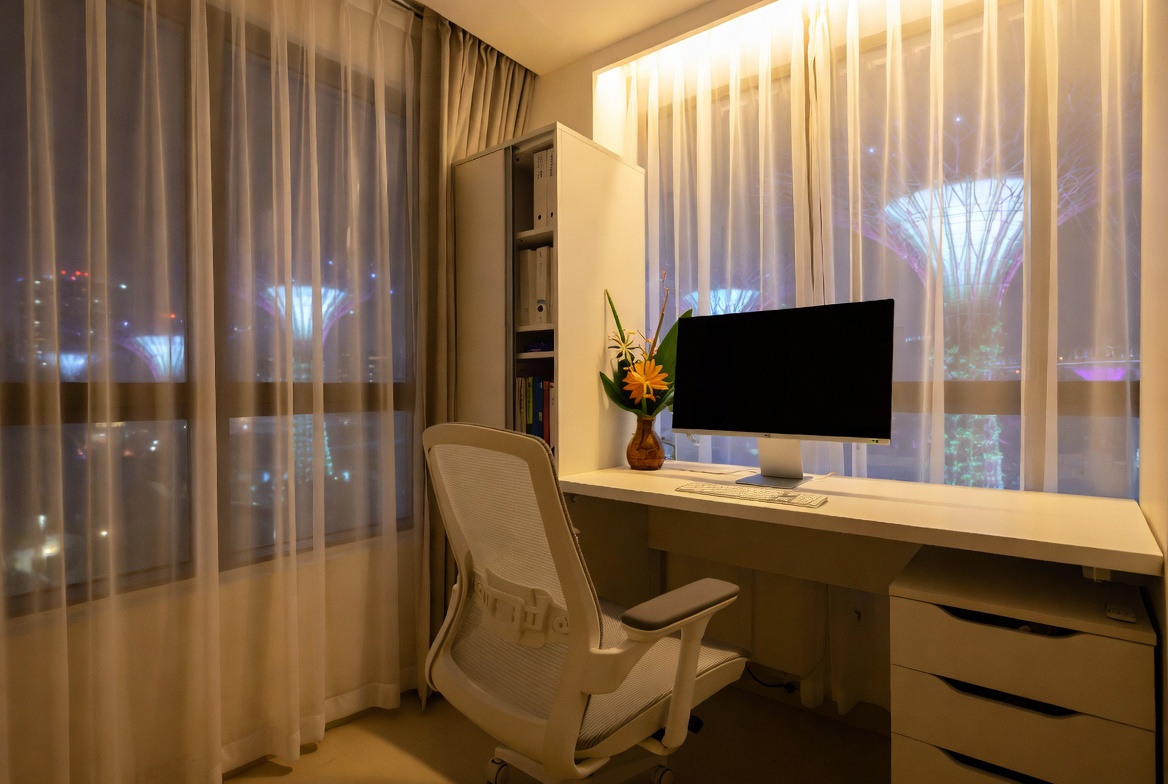
Alright, let's talk chairs. You've got your computer table sorted, maybe even that fancy monitor stand. But if you're plonking down on just *any* old chair for those long work hours, you're doing yourself a disservice, lah. Think about it: you spend hours sitting, and a bad chair? Confirm can cause aches and pains later on. Plus, who can concentrate properly when they're constantly fidgeting cos their back is killing them?
Lumbar support. Sounds technical, right? Actually, it's just a fancy way of saying "support for your lower back." In Singapore’s hot and sticky conditions and fast-paced daily grind, getting quality rest can feel like a real luxury when you’re waking up with backaches or dragging through the morning despite hitting the bed early. Many homeowners tolerate an outdated sleep surface for a long time because shopping for a replacement seems overwhelming—overwhelming variety, bewildering firmness ratings, and concerns it might not fit their body type and sleep style. That’s exactly why finding the furniture showroom changes everything—it delivers the ideal mix of proper spinal alignment, excellent airflow and cooling, pressure relief, and built-to-last construction so you genuinely rise feeling refreshed instead of achy and sluggish. Suddenly mornings start easier, energy levels stay steadier, and even your partner sees how much better you rest. Checking out thoughtfully chosen picks on platforms like Wondrous La Vie makes it far easier, letting you see highly recommended options with authentic Singapore user experiences and realistic images to match what truly works for your bedroom.. And trust me, your lower back will thank you for it. See, when you sit for long periods, your lower back tends to curve inwards – not in a good way. This puts a strain on your spine and can lead to all sorts of problems, from mild discomfort to chronic back pain. No joke one!
A good ergonomic chair will have adjustable lumbar support. This means you can customize the level of support to fit the natural curve of your spine. Look for chairs where you can adjust both the height and the depth of the lumbar support. That way, you can really dial it in to *your* specific needs. Some chairs even have dynamic lumbar support, which automatically adjusts as you move. Steady, right?
Think of it like this: good lumbar support is like having a mini massage therapist working on your back all day. Okay, maybe not *that* good, but you get the idea. It helps to maintain a healthy posture, reduces strain, and keeps you feeling comfortable and supported, even after hours at your computer table. And let's be honest, anything that makes those long hours a little more bearable is a win, right?
When you're trying out chairs, pay attention to how the lumbar support feels. Does it feel like it's pushing too hard, or not enough? Can you easily adjust it to find the sweet spot? Don't be shy about spending some time in the chair, mimicking your typical working posture. It's an investment in your health and well-being, so worth taking the time to get it right.
Okay, armrests. They might seem like a minor detail, right? Just something to rest your arms on. But actually, they play a crucial role in supporting your upper body and preventing strain on your shoulders, neck, and wrists. Especially when you're using your computer table for hours on end.
Adjustable armrests are key. You want to be able to adjust the height, width, and even the angle of the armrests to fit your body and your working style. Ideally, your elbows should be bent at a 90-degree angle when your arms are resting on the armrests, and your shoulders should be relaxed. If your armrests are too low, you'll find yourself hunching over, which can lead to neck and shoulder pain. Too high, and you'll be raising your shoulders, which is just as bad. Like that also not good, you know?
Some armrests even have padding or cushioning for extra comfort. This can be especially helpful if you spend a lot of time typing. Look for armrests that are wide enough to support your forearms, and that don't dig into your skin. You don't want to end up with sore elbows after a long day at the computer table!
And here's a little curiosity bit: did you know that some ergonomic chairs even have armrests that can slide forward and backward? This allows you to customize the position of your armrests even further, to perfectly match your reach and posture. It's all about finding what works best for *you*.
So, you've got your lumbar support sorted, your armrests adjusted. Now, let's talk about posture. Because even the best ergonomic chair won't do you much good if you're still slouching like a sack of potatoes, right?
The goal is to maintain a neutral spine. This means keeping your back straight, your shoulders relaxed, and your head aligned with your spine. Imagine a string pulling you up from the top of your head. This will help you maintain good posture and prevent strain on your neck and back.
Make sure your feet are flat on the floor, or on a footrest if your feet don't reach the floor. This will help to stabilize your lower body and prevent you from slouching. And don't forget to take breaks! Get up and stretch every 20-30 minutes. This will help to prevent stiffness and fatigue. Even a quick walk around your HDB flat can make a big difference.
Think of your ergonomic chair as a tool to help you maintain good posture. It's not a magic bullet, but it can make a big difference in your comfort and well-being. And remember, good posture isn't just about sitting up straight. It's about being mindful of your body and making sure you're supporting it properly throughout the day. After all, your body is your temple, right?
Choosing the right ergonomic chair for your computer table setup is an investment in your health and productivity. By paying attention to lumbar support, adjustable armrests, and posture, you can create a workspace that supports your body and helps you stay comfortable and focused for hours on end. So go ahead, take the time to find the perfect chair for you. Your back will thank you for it!

Okay, let's talk about lighting. You've got your brand new computer table all set up, right? Monitor at the right height, keyboard and mouse within easy reach… but are your eyes screaming by lunchtime? Lighting is often the forgotten piece of the ergonomic puzzle, but trust me, it's a big one, especially when you're clocking long hours in front of the screen. We want to create a workspace that's not just functional, but actually comfortable, even enjoyable, to be in. After all, your home office is where you get things done, right? So, let's make it a place you actually want to be.
Think about it: Singapore’s bright, and sometimes that brightness streams right into your workspace. And while natural light is great (more on that in a bit!), too much of it, or the wrong kind, can lead to glare and eye strain that'll leave you reaching for the Panadol before you know it. That's not the goal, lah! We want you feeling productive and energized, not battling a headache. So, let’s dive into how to get your lighting just right for your computer table setup.
Natural light is fantastic. It boosts your mood, helps regulate your sleep cycle, and just makes a room feel more alive. But, and it's a big but, you need to manage it properly. The key is to position your computer table so that the light source is to the side, rather than directly in front or behind you. Why? Because direct sunlight on your screen creates glare, which forces your eyes to work harder. And nobody wants that, especially when you're already staring at spreadsheets or design mockups all day. Think of it like trying to read a book on the beach at midday – not exactly comfortable, is it?
Consider your window coverings too. Sheer curtains can diffuse the light, softening it and reducing harsh shadows. Blinds or adjustable shutters are even better, giving you precise control over the amount of light entering the room. If you're facing east, you might want heavier curtains to block the morning sun. West-facing? Prepare for the afternoon glare! Experiment to find the sweet spot where you get enough natural light to feel good, without sacrificing your visual comfort. Some folks even use plants to filter the light – a nice, natural solution, and it adds a touch of green to your workspace, which is always a plus. Imagine, a mini indoor garden right next to your ergonomic computer table – steady and stylish!
Even with the best natural light management, you'll still need a good desk lamp, especially for those late-night work sessions or those days when Singapore weather decides to be gloomy. But not just any lamp will do. You want one that provides adequate, adjustable, and directional light, without creating glare. Look for a lamp with an adjustable arm and head, so you can position the light exactly where you need it. This is especially important if you're doing detail-oriented work, like drafting or coding. The flexibility lets you illuminate specific areas of your computer table without flooding the entire room with light.
When choosing a bulb, opt for an LED bulb with a color temperature of around 2700-3000K (Kelvin) for a warm, inviting light, or 4000-5000K for a brighter, more energizing light. Avoid harsh, blue-toned light, especially in the evening, as it can interfere with your sleep. Dimmable lamps are fantastic because they let you adjust the brightness to match the ambient light in the room. You might want a brighter light during the day and a softer light in the evening. Some lamps even have built-in USB charging ports, which is super convenient for keeping your phone or tablet charged while you work. Talk about maximizing space on your computer table!
Okay, so you've got your natural light sorted and your desk lamp perfectly positioned. But what about the light coming directly from your monitor? All that blue light can really strain your eyes, especially if you're staring at it for hours on end. That's where anti-glare screen protectors come in. These simple accessories can make a huge difference in reducing eye strain and improving your overall viewing experience. They work by diffusing the light emitted by your screen, reducing reflections and glare. This makes it easier to see the screen, even in bright environments. And they're relatively inexpensive and easy to install, confirm can improve your daily work life!
There are different types of anti-glare screen protectors available, so do your research to find one that's right for your monitor. Some are matte, which provides the best glare reduction, but can sometimes make the screen look a little less sharp. Others are glossy, which preserves the clarity of the screen but may not be as effective at reducing glare. Consider your priorities and choose accordingly. And don't forget to clean your screen regularly! Dust and fingerprints can exacerbate glare, so keep it clean for optimal viewing. Who knew something so simple could make such a big difference to your ergonomic computer table setup?
Ultimately, the goal is to create a balanced lighting environment that's comfortable for your eyes and conducive to productivity. Avoid extreme contrasts between your screen and the surrounding environment. If your screen is very bright and the room is very dark, your eyes will have to work harder to adjust. Try to create a more even level of illumination throughout the room. This can be achieved by using a combination of natural light, desk lamps, and overhead lighting. Consider adding some ambient lighting, such as a floor lamp or wall sconce, to soften the shadows and create a more inviting atmosphere. A well-lit room just feels better, doesn't it? It's not just about seeing clearly; it's about creating a space that's both functional and enjoyable to be in.
And don't be afraid to experiment! What works for one person might not work for another. Play around with different lighting configurations until you find what feels best for you. Pay attention to how your eyes feel after a few hours of working at your computer table. Are they tired? Strained? Adjust your lighting accordingly. Remember, your comfort is paramount. After all, you're the one who's going to be spending hours in this space. So, make it a place you love to be, a place where you can focus, create, and achieve your goals, all while keeping your eyes happy and healthy. With Singapore’s compact homes and hot sticky weather, finding furniture that’s both stylish and practical can feel like a constant search—especially when you need items that last through the years without fading or wearing out. Many busy homeowners end up choosing mainstream choices that appear decent in photos but disappoint in real life—either too flimsy for everyday household wear or not breathable enough for our humid conditions. That’s why visiting a reliable mattress store curated through Wondrous La Vie really stands out—it links you seamlessly with carefully chosen ranges of top-grade seating, mattresses, meal-area pieces, and more, with actual physical displays or detailed visuals so you can feel confident about what fits your HDB, condo, or landed space. You get that reassurance knowing the pieces are tailored to local needs—resilient construction, smart sizing, and designs that actually make your home feel more shiok and welcoming. In the end, the perfect platform turns what could be a stressful errand into an exciting step toward a space you can’t wait to return to.. Now, go forth and illuminate! And remember, a well-lit workspace is a happy workspace. Like that, steady pom pi pi!
Okay, let's be real. How many of us actually enjoy looking at a Medusa-like tangle of cables snaking around our Furniture? I know I don't! It's distracting, it's unsightly, and honestly, it's a dust magnet. If you're aiming for that productive, zen-like home office vibe, wrangling those cords is the first step. But don't worry, it's not as daunting as it seems. We'll get your computer table looking spick and span in no time, confirm can!
Think about it: when your workspace is chaotic, your mind tends to follow suit. You spend precious minutes untangling cords instead of tackling that important project. That slight frustration builds up, chipping away at your focus and creativity. A clean and organized computer table, on the other hand, creates a sense of calm and control. You know where everything is, you can access it easily, and you're less likely to get sidetracked by visual clutter. Plus, a tidy space just feels good, right? It's like a little mental reset button every time you sit down.
Now, I know what you might be thinking: "Easier said than done, lah!" Especially if you're working with a small space, like many of us in Singapore. But trust me, even small changes can make a big difference. And the best part? You don't need to spend a fortune on fancy gadgets. A few simple, affordable solutions can transform your computer table from a chaotic mess into a haven of productivity.
Let's start with the basics. Cable ties are your best friend. Seriously. These little guys are inexpensive and incredibly versatile. Use them to bundle cables together, keeping them neat and tidy. You can even color-code them to easily identify different cords. Velcro straps are another great option, especially if you need to frequently adjust or rearrange your cables. Unlike zip ties, they're reusable and won't damage your cords.
Next up: cable organizers. These come in all shapes and sizes, from simple clips that attach to the edge of your desk to larger boxes that conceal power strips and excess cable length. Think about where your cables are coming from and where they need to go, and choose organizers that fit your specific needs. For example, a cable sleeve can bundle all the cords running down the back of your computer table into a single, manageable unit.
And don't forget about cable management trays! These attach underneath your computer table and provide a hidden space to store power strips, adapters, and excess cable length. They're a great way to keep your desk surface clear and clutter-free. Plus, they prevent cables from dangling down and getting tangled under your feet. Safety first, right?
Okay, cables are tamed, but what about all the other stuff that tends to accumulate on your computer table? Pens, sticky notes, charging cables, that random stapler you haven't used in months... it all adds up. That’s where desk organizers come in.
Start by decluttering. Be honest with yourself: what do you really need within arm's reach? Get rid of anything that's just taking up space. Then, invest in a few organizers that will help you keep everything in its place. A simple desk caddy can hold pens, pencils, and other small items. A monitor stand with built-in storage can free up valuable desk space. And a document organizer can keep your important papers neat and accessible.
Consider vertical storage solutions, too. A wall-mounted shelf or a set of drawers can provide extra storage without taking up valuable desk space. This is especially helpful if you're working with a small Home Office Computer Table. Remember, the goal is to create a system that works for you. Experiment with different organizers until you find a setup that keeps your desk tidy and your mind clear.
Sometimes, no matter how hard you try, there are just some cables that you can't hide. Maybe it's the power cord for your monitor, or the USB cable for your printer. In those cases, get creative with concealment.
Use decorative boxes or baskets to hide power strips and surge protectors. Run cables behind furniture or along baseboards to minimize their visibility. And if you're feeling really ambitious, you can even install cable raceways to conceal cables along walls or ceilings. There are even some clever hacks using things like binder clips or even Lego bricks to manage cables in a fun and unexpected way!
Another thing to consider is wireless peripherals. While they might be a bit more expensive upfront, a wireless keyboard and mouse can eliminate two more cables from your computer table, creating a cleaner and more streamlined look. Plus, they give you more freedom to move around and work comfortably.
Creating a clutter-free computer table isn't just about buying the right organizers. Singaporeans are always on the lookout for intelligent ways to refresh their homes without spending too much, especially when HDB renovations or condo makeovers can already eat up a big chunk of the budget. Between rising costs and the need for a warmer, more practical home, many homeowners time their purchases carefully to improve couches, beds, and dining furniture that actually improve home living noticeably. That’s when jumping on bed frames proves to be a smart move—it lets you secure premium quality furniture at significant savings, often with bonus offers like complimentary installation, added protection plans, or bundle deals that stretch your dollar further. SUDDENLY it becomes possible to get that luxury seating you’ve wanted or a better back-supporting bed without the second thoughts, turning your home into an even more inviting spot for family time and relaxation after tiring office days. Checking platforms like Wondrous La Vie puts you ahead on the newest promotions, so you can evaluate, picture, and claim the best deals that fit your home and taste just right.. It's also about developing good habits. Make it a habit to tidy up your desk at the end of each day. Put things back where they belong, throw away any trash, and wipe down the surface.
Regularly declutter your desk to prevent items from accumulating. Get rid of anything you don't need or use. And don't be afraid to experiment with different organizational strategies until you find what works best for you.
Think of your computer table as an extension of your mind. A tidy desk equals a tidy mind, and a tidy mind equals increased focus, productivity, and creativity. So take the time to tame those cables, organize your supplies, and create a workspace that inspires you to do your best work. You'll be surprised at the difference it makes.
And hey, if you're looking to upgrade your entire computer table setup, remember to consider ergonomic factors like height, adjustability, and monitor placement. After all, a comfortable and supportive workspace is essential for long hours of productivity. This is especially true if you're using a Home Office Computer Table.
So, are you ready to ditch the cable chaos and embrace a clutter-free zone? I steady know you can do it! Just take it one step at a time, and before you know it, you'll have a computer table that's both functional and beautiful. Happy organizing!
Position your monitor at arm's length and ensure the top of the screen is at or slightly below eye level. This reduces strain on your neck and eyes, promoting a more comfortable posture. Consider using a monitor stand to achieve the ideal height and angle for prolonged viewing.
Place your keyboard and mouse close to your body to avoid reaching and straining your shoulders and arms. Your elbows should be bent at a 90-degree angle, and your wrists should be straight. A keyboard tray can help achieve optimal positioning.
Adjust your chair so that your feet are flat on the floor or supported by a footrest. Ensure your lower back is properly supported by the chair's lumbar support. This promotes good posture and prevents back pain during extended work sessions.
The desk should be at a height that allows your legs to fit comfortably underneath with adequate clearance. Avoid desks that are too low, forcing you to hunch over, or too high, causing your shoulders to tense. An adjustable-height desk can provide maximum flexibility.
Take short breaks every 20-30 minutes to stand up, stretch, and move around. This helps to relieve muscle tension and improve circulation. Simple stretches like neck rolls and wrist extensions can make a significant difference over long hours.

```html
So, you've got your new BTO flat, or maybe you're finally upgrading your home office. That's fantastic! But before you dive headfirst into work (or Netflix, we won't judge!), let's talk about something super important: your computer table setup. Seriously, spending hours hunched over a desk isn't just uncomfortable; it can lead to aches, pains, and even long-term health issues. No one wants that, right? Especially when you're trying to enjoy your new space. Think of this as investing in your well-being, one adjustment at a time. It's all about creating a workspace that works *with* your body, not against it. This isn't just about a fancy standing desk (though those are cool too!); it's about the fundamentals. Let's get started!
Okay, first things first. Let's take a good, hard look at your current setup. Don't worry; we're not here to judge your cable management skills (or lack thereof!). Ask yourself these questions: How do you *feel* after an hour at your desk? Two hours? Four? Are you constantly shifting around, trying to find a comfortable position? Are you experiencing any neck pain, backaches, wrist pain, or eye strain? These are all signs that your current setup isn't quite cutting it. Maybe your chair's too low, your monitor's too far away, or your keyboard's in an awkward position. It's like trying to wear shoes that are a size too small – eventually, you're gonna feel it! This initial assessment is all about identifying the problem areas so we know what to focus on. Grab a notepad (or your phone) and jot down anything that feels off. Even seemingly small discomforts can add up over time. Remember, your body is telling you something, so listen up! This step also helps you define what you need when you buy furniture. Thinking about the height of your current table, is it adjustable?
Consider the size of your computer table too. Is it big enough to comfortably accommodate all your equipment – monitor, keyboard, mouse, and any other essentials like a notepad or a cup of kopi? A cramped workspace can lead to awkward postures and increased strain. And hey, while you're at it, take a look at your lighting situation. Is your workspace well-lit, or are you squinting at your screen in the dark? Proper lighting can make a huge difference in reducing eye strain and improving overall comfort. Observe how you move around your workspace. Do you have enough room to stretch your legs and move freely? Or are you constantly bumping into things? A cluttered or cramped workspace can contribute to stress and discomfort. It's all about creating a space that feels comfortable, functional, and conducive to productivity. After all, we want to enjoy our workspace, not dread it, right? So, take your time, be honest with yourself, and document everything you observe. This is the foundation for creating an ergonomic computer table setup that will support your well-being and productivity for years to come.
Think of your chair as the foundation of your entire ergonomic setup. If your chair isn't right, nothing else will be. It's like building a house on shaky ground – eventually, things are gonna crumble. So, what makes a good ergonomic chair? Look for these key features: adjustable height, lumbar support, adjustable armrests, and a comfortable seat. The goal is to find a chair that supports your spine's natural curve and allows you to sit with your feet flat on the floor (or on a footrest if needed). When you sit down, your hips and knees should be at roughly a 90-degree angle. Your lower back should be comfortably supported by the lumbar support. If your chair doesn't have adjustable lumbar support, you can use a small cushion or rolled-up towel to provide extra support. Your armrests should be adjusted so that your elbows are at a 90-degree angle and your shoulders are relaxed. If your armrests are too high or too low, they can cause shoulder and neck pain. And hey, don't forget about the seat itself. It should be wide enough and deep enough to comfortably support your thighs, with a slightly curved front edge to prevent pressure on the back of your knees. It's also important to take breaks and stretch regularly, even with the best chair in the world. Get up, walk around, and do some simple stretches to keep your muscles loose and your blood flowing.
Choosing the right chair is an investment in your health and well-being. Don't be afraid to spend a little more to get a chair that fits your body and provides the support you need. After all, you're going to be spending a lot of time in it! And remember, even the best chair needs to be adjusted properly to work effectively. Take the time to experiment with different settings and find what feels best for you. If you're unsure where to start, there are plenty of resources available online, including guides and videos that can walk you through the process. And hey, if you're still not sure, consider consulting with an ergonomist or physical therapist. They can assess your specific needs and recommend the best chair and setup for you. Think of it like getting fitted for a custom suit – it's all about finding the perfect fit for your body. And once you've found that perfect fit, you'll be amazed at how much more comfortable and productive you can be. Confirm can improve your work life balance one, is it?
Alright, now that your chair's sorted, let's move on to your monitor. This is where things can get tricky, but don't worry, we'll break it down. The most important thing is to position your monitor at the right height and distance. Think of it like finding the sweet spot for watching TV – you want to be able to see the screen clearly without straining your neck or eyes. The general rule of thumb is to position your monitor so that the top of the screen is at or slightly below eye level. This will help prevent you from tilting your head up or down, which can lead to neck pain. The distance between you and your monitor should be about an arm's length away. This will allow you to see the entire screen without having to strain your eyes or lean forward. If you're using multiple monitors, try to position them so that the primary monitor is directly in front of you and the secondary monitors are angled slightly to the side. This will help prevent you from constantly turning your head back and forth, which can also lead to neck pain. And don't forget about glare! Make sure your monitor is positioned so that it's not reflecting light from windows or overhead lights. Glare can cause eye strain and headaches, so it's important to minimize it as much as possible. You can use blinds, curtains, or an anti-glare screen filter to help reduce glare.
If you're using a laptop, consider investing in a separate monitor, keyboard, and mouse. This will allow you to position your screen at the correct height and distance without having to hunch over your laptop. It might seem like a small thing, but it can make a huge difference in your comfort and productivity. You can also use a laptop stand to raise your laptop screen to a more comfortable height. There are many different types of laptop stands available, so you can choose one that fits your needs and budget. Remember, the goal is to create a workspace that supports your body and allows you to work comfortably for extended periods of time. And if you're not sure where to start, there are plenty of resources available online, including guides and videos that can walk you through the process. In Singapore’s tight condo apartments and condos, the master bedroom often serves as both retreat and multi-use space—a haven for unwinding after hectic work shifts, catch up on reading, or even sneak in a quick work-from-home setup when required. It’s common for local residents to feel stuck with layouts that seem too tight, overly bright illumination, or cluttered cabinets taking up room, making the room feel more functional than relaxing. That’s where thoughtful furniture shop makes the biggest impact—it focuses on intelligent layout optimisation, soothing neutral tones, space-saving furniture, and clever lighting to create a tranquil sanctuary that maximises comfort while keeping everything tidy and airy. All at once your sleep space evolves into the place you can’t wait to reach at the end of the day, helping you de-stress more effectively, enjoy deeper rest, and wake up feeling more refreshed for whatever the next day brings. Sites such as Wondrous La Vie feature abundant genuine homeowner transformations and easy connections to professionals skilled in these functional and stylish local bedroom renovations.. It's like finding the perfect pair of glasses – it's all about finding the right fit for your eyes and your body. So, take your time, experiment with different settings, and find what feels best for you. Your eyes will thank you for it! Like that, steady can see clearer one.
Okay, we've got your chair and monitor sorted. Now, let's talk about your keyboard and mouse. These are the tools you use to interact with your computer, so it's important to position them correctly to prevent wrist and arm pain. The goal is to keep your wrists straight and your elbows close to your body. Your keyboard should be positioned directly in front of you, with your elbows at a 90-degree angle and your wrists straight. If your keyboard is too high or too low, it can cause wrist pain and carpal tunnel syndrome. You can use a keyboard tray to adjust the height and angle of your keyboard. Your mouse should be positioned close to your keyboard, so you don't have to reach too far to use it. Use your mouse with your whole arm, not just your wrist. This will help prevent wrist pain and fatigue. Consider using an ergonomic mouse that is designed to fit your hand comfortably and reduce strain on your wrist. There are many different types of ergonomic mice available, so you can choose one that fits your needs and preferences. If you're experiencing wrist pain, take frequent breaks and stretch your wrists and hands. You can also use a wrist rest to provide extra support and cushioning for your wrists.
Remember, the key is to keep your wrists straight and your elbows close to your body. This will help prevent strain and pain in your wrists, arms, and shoulders. And hey, don't forget about your posture! Sit up straight with your shoulders relaxed and your core engaged. This will help support your spine and prevent back pain. It's like learning to play a musical instrument – it takes practice and patience to develop good technique. But once you've mastered the fundamentals, you'll be able to play for hours without pain or discomfort. So, take your time, experiment with different settings, and find what feels best for you. Your wrists and arms will thank you for it! Some people even use a standing computer table to circumvent these issues, but it's not a must.
Alright, let's talk about the often-overlooked aspects of your computer table setup: lighting and environmental factors. These may seem like minor details, but they can have a significant impact on your comfort and productivity. Think of it like creating the right ambiance in your home – you want a space that feels comfortable, inviting, and conducive to relaxation. The same goes for your workspace. You want a space that feels comfortable, functional, and conducive to productivity. Proper lighting is essential for reducing eye strain and preventing headaches. Natural light is always the best option, but if you don't have access to natural light, you can use artificial lighting to create a similar effect. Use a combination of ambient lighting (general room lighting) and task lighting (lighting specifically for your workspace). Avoid harsh fluorescent lights, which can cause eye strain and headaches. Instead, opt for soft, warm lighting